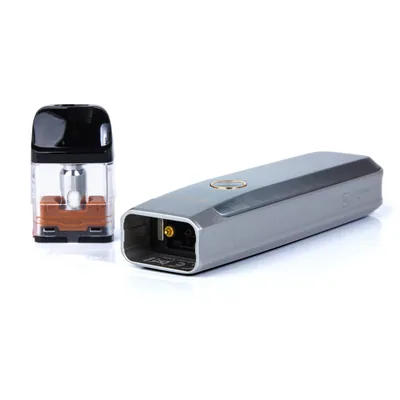
Remove the mouthpiece, fill the pod, click it in and either inhale or hold the button. Press the button three times to change wattage, and the G3 Pro turns from a beginner kit into something you can properly tune.
The short version
- Comes with 0.4 ohm and 0.9 ohm Caliburn G3 pods plus a USB-C cable.
- Output runs from 5 to 35W; press the button three times to change wattage.
- 0.9 ohm with 50% VG for MTL, 0.4 ohm with higher VG for RDL.
- The button can be locked to stop it firing in your pocket.
What is in the box
The Uwell Caliburn G3 Pro includes the device, a Caliburn G3 0.4 ohm pod, a Caliburn G3 0.9 ohm pod, a USB-C charging cable and a user manual.
The built-in 1000mAh battery can last up to a full day, and the output is adjustable from 5 to 35W. An OLED screen shows your firing method, wattage and battery level, and an airflow control lets you tune the draw.
At 91g it feels solid without being heavy, and the finish options run from plain colours to leather and wood effects.
Filling and first puff
To refill a Caliburn G3 pod, remove the mouthpiece to reach the fill port, fill to just below the top and press the mouthpiece back on. With a new pod, wait five minutes before the first draw so the mesh coil soaks.
Click the pod in and vape by inhaling on the mouthpiece or by pressing and holding the button. The screen shows which firing method is active.
Start with the 0.9 ohm pod and the airflow mostly closed if you want a discreet MTL hit. Switch to the 0.4 ohm pod and open the airflow when you want more vapour.
- 1Mouthpiece
- 2Pod and e-liquid window
- 3Coil
- 4Contacts and magnets
- 5Airflow
- 6Battery
- 7Fire button or auto-draw sensor
- 8USB-C charging port
Changing wattage and locking the button
To change the wattage, press the button three times and adjust using the on-screen readout. Keep within the rating for the pod you are using: the G3 0.4 and 0.6 ohm pods are rated 5 to 25W, and the 1.0 ohm pod 5 to 10W.
The G3 Pro also takes Caliburn GPP and GPP Alpha pods, rated 35W for 0.4 ohm, 25W for 0.6 ohm, 15W for 0.9 ohm and 13W for 1.2 ohm.
For peace of mind, the button can be locked to prevent unwanted firing in a bag or pocket. Your manual shows the lock sequence. Spare pods live in the Uwell pod range.
Source: Ratings from the Caliburn G3 Pro product listing.
Picking e-liquid for each pod
For a discreet MTL inhale, pair the 0.9 ohm pod with a 50% VG e-liquid. Most nic salts fit the bill and feel smooth at 10mg or 20mg.
For more vapour, the 0.4 ohm pod pairs with a higher VG vape juice for an RDL inhale. A 70% VG liquid at a lower strength is the usual choice, because each puff carries much more vapour.
Nicotine is addictive. Using 20mg nic salt in the 0.4 ohm pod would make each puff far stronger than in the 0.9 ohm pod, so step down when you switch.
Three common problems and battery tips
- Burnt taste after changing wattage: the power is above the pod's rating. Press three times and bring it back into range.
- Leaking from the 0.4 ohm pod: thin liquid floods a lower resistance coil. Use a higher VG juice.
- Firing in a pocket: lock the button when you put it away.
Higher wattage drains the 1000mAh battery faster, so if you vape the 0.4 ohm pod hard, plan a midday charge. Use the included cable, charge before it is empty and keep it out of heat. Batteries that are regularly cooked on a dashboard lose capacity far sooner.
Who the G3 Pro suits
The Caliburn G3 Pro suits vapers who want a refillable pod kit with real control: adjustable wattage, button or auto draw, a screen and a lock. Two pods in the box let you try MTL and RDL from the start.
If you do not need any of that, the buttonless Caliburn G3 Lite uses the same pods for less money. If you want a bigger battery with similar controls, the Vaporesso Xros Pro 2 carries 2000mAh.
For a pod kit that stays in your pocket all week, it is a strong pick.

Quick answers
How do you change the wattage on the Caliburn G3 Pro?
Press the button three times, then adjust the wattage shown on the OLED screen.
What pods come with the Uwell Caliburn G3 Pro?
A 0.4 ohm and a 0.9 ohm Caliburn G3 pod.
Can you lock the Caliburn G3 Pro?
Yes, the button can be locked to prevent unwanted activation.
What pods fit the Caliburn G3 Pro?
Caliburn G3, GPP and GPP Alpha pods.